Promoting Your Release with the Asset Generator
Use EVEN’s Asset Generator to create release graphics from your artwork and keep your music promotion consistent.
Promoting Your Release with the Asset Generator
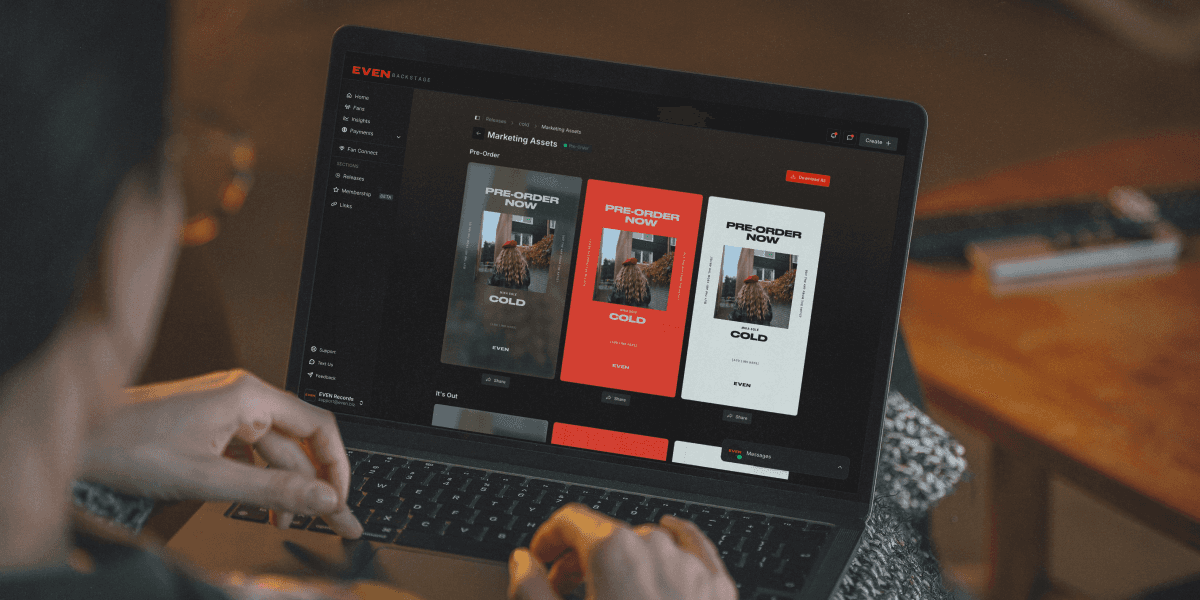
When you create a release on EVEN Backstage, a full set of ready-to-use promotional graphics is automatically generated using your album art, artist name, and release title. No design software, no templates to fill in, no extra steps.
Most artists lose momentum on releases not because the music is bad, but because promotion falls apart in the days after the drop. Life gets in the way, content runs dry, and posting feels like a chore. The Asset Generator is built to remove that friction. Everything you need to run a complete release campaign is ready before your music even goes live.
This playbook walks you through how to access your assets, what each one is for, and how to build a promotional campaign around them from pre-release through the weeks after your drop.
How to Access Your Assets
You will be prompted to visit your marketing assets immediately after creating a release. Here is how to get there:
Create your release in Backstage as normal (title, artwork, tracks, pricing)
On the confirmation screen, click the purple banner: "We prepared ready-to-use marketing assets for you"
You will land on the Marketing Assets page under Releases > Your Release > Marketing Assets
Browse each section, pick a color theme, and hit Download -- or grab everything at once with Download All
You can return to this page at any time by going to Releases, selecting your release, and clicking the Marketing Assets tab. Assets do not expire and can be downloaded as many times as you need.
What's Included
The Asset Generator produces seven different asset types. Each one is designed for a specific moment in your release campaign. Here is a quick overview, followed by a breakdown of each one.
Asset | What it's for |
It's Out | Drop day announcement. Your main graphic for launch day across all platforms. |
Last Chance | Urgency post for the end of a pricing window or campaign deadline. |
Gift This Album | Word-of-mouth prompt asking fans to share your release with someone who would love it. |
Fan Message | A thank you graphic. Personalize it with a real fan comment or DM screenshot. |
What Fans Are Saying | Social proof post. Add a fan reaction screenshot to show real audience response. |
Fan Screenshot | A clean frame for resharing fan posts and comments directly in your stories. |
Link In Bio | Bio link reminder. Direct followers to your EVEN page whenever you update your link. |
Building a Campaign Around Your Assets
The seven assets together cover every phase of a release rollout. Here is how to map them across a three-week campaign.
1 to 2 weeks before drop
Update your link-in-bio to your EVEN release page and post a Link In Bio story
Drop day
Lead with It's Out on every platform, post to feed, stories, TikTok, and anywhere else you have an audience
Rotate color themes across platforms so the content does not look identical everywhere
Make sure your EVEN link is live and working before you post anything
Post a Link In Bio story early in the day to catch fans who come to your profile
Respond to every comment and DM you get today, engagement on drop day signals to algorithms that your content is worth pushing
Days 2 to 7
Start collecting fan reactions from comments, DMs, and social mentions
Post a Fan Message or What Fans Are Saying asset once you have a strong reaction to showcase
Use Fan Screenshot to reshare any fan posts that mention the release
Keep your EVEN link prominent in your bio and stories
Days 8 to 14
Post Gift This Album to encourage fans to spread the release to people in their circle
Continue sharing fan reactions with Fan Message and What Fans Are Saying -- fresh reactions keep the content feeling new
If you have a limited pricing window, post Last Chance in the final 48 hours
Post a second round of It's Out with a different color theme to reach anyone who missed the initial announcement
Tips
Download everything before your release goes live. Schedule posts in advance using Instagram, Buffer, or Later so you are not scrambling on drop day or the days after.
Do not post everything at once. Spreading your assets across two to three weeks keeps your release visible for longer and gives fans more chances to see it. Most people will not buy the first time they see something.
Personalize the fan templates. The Fan Message, What Fans Are Saying, and Fan Screenshot assets all have placeholder areas. Real screenshots from your community will always outperform a generic version of the graphic.
Rotate your color themes. Using the same theme repeatedly trains your audience to scroll past it. Switching between dark, red, and light keeps the content feeling fresh even when the message is similar.
Always include your EVEN link. Every post is an opportunity to drive a sale. Make it easy for fans to go from seeing your graphic to being on your release page in two taps.
Track what works.
Pay attention to which assets drive the most profile visits, link clicks, and sales. Over time you will learn which formats and themes resonate most with your specific audience, and you can lean into those on future releases.
Search articles…